Building a Window Resizer with AutoHotkey, React, and Electron
Jun 10, 2024
Update, August 2026: I rewrote this app from scratch in AutoHotkey v2 and deleted Electron entirely — 64 MB to 1.2 MB. This post is the original build, kept as it was written.
Introduction
Managing multiple windows across different monitors can be challenging, especially when precision is required. This is particularly true for developers, power users, and anyone who needs to organize their workspace efficiently. To address this issue, I developed the "Window Center & Resizer" application. This tool, which has been featured on prominent sites like Softpedia and MajorGeeks, empowers users to quickly center and resize their windows using custom keyboard shortcuts. In this blog post, I’ll walk you through how I built this app, starting with the core AutoHotkey (AHK) script that drives its functionality, and then exploring how it integrates with modern web technologies like React and Electron.
Core Technologies
The "Window Center & Resizer" application is built using a combination of the following technologies:
- AutoHotkey (AHK): Known for its powerful scripting capabilities, AHK is ideal for precise window management tasks. It enables the automation of tasks like window positioning and resizing through simple scripts.
- React: A popular JavaScript library for building user interfaces, React was chosen for its component-based architecture, which makes it easy to manage and update the UI as the application grows.
- Electron: This framework allows the app to run as a cross-platform desktop application, making it possible to integrate web technologies with native desktop functionalities seamlessly.
These technologies were chosen for their specific strengths and the way they complement each other in creating a robust and flexible desktop application.
Understanding the AHK Script
At the heart of the "Window Center & Resizer" application is an AutoHotkey script that manages the core functionality of window centering and resizing. The script reads user-defined settings from a JSON file and sets up the hotkeys that trigger these actions.
Loading User Settings & Hotkey Setup
The script starts by loading user settings from a JSON file and converting the keybindings into a format that AutoHotkey can understand. This conversion is handled by the convertHotkeysJsToHotHotkeys function.
hotkeysJsToHotHotkeys := Map("shift", "+", "ctrl", "^", "alt", "!", "meta", "#")

convertHotkeysJsToHotHotkeys(key) {
  keys := StrSplit(key, "+")  ; Split key by "+"
  hotkeys := []
  for each, k in keys {
    k := StrLower(Trim(k))
    if (hotkeysJsToHotHotkeys.Has(k))
      hotkeys.push(hotkeysJsToHotHotkeys.Get(k))
    else
      hotkeys.push(StrUpper(k))
  }
  return Join("", hotkeys*)
}

jsonContent := Fileread(A_AppData . "\\window-center-resize\\settings.json")
json := jxon_load(&jsonContent)

centerWindowKey := convertHotkeysJsToHotHotkeys(json["centerWindow"]["keybinding"])
resizeWindowKey := convertHotkeysJsToHotHotkeys(json["resizeWindow"]["keybinding"])

if (centerWindowKey != "")
  Hotkey(centerWindowKey, CenterWindow, "On")
if (resizeWindowKey != "")
  Hotkey(resizeWindowKey, ResizeWindow, "On")
Explanation:
- Loading User Settings: The script reads user settings from a JSON file, which includes the keybindings and window sizes defined in the app’s UI.
- Hotkey Definitions: The script dynamically sets up hotkeys based on the user’s preferences. It defines functions for centering and resizing windows when the hotkeys are pressed.
- Keybinding Conversion: The
convertHotkeysJsToHotHotkeysfunction converts keybindings from a user-friendly format (e.g., "Ctrl+Shift+C") into a format recognized by AutoHotkey (e.g.,^+C). This ensures that user-defined hotkeys are correctly interpreted and executed by AutoHotkey.
Window Management Logic
The core functionality for managing windows is implemented in the CenterWindow and ResizeWindow functions, which handle the actual positioning and resizing of windows.
CenterWindow() {
  hwnd := WinExist("A")
  if (hwnd) {
    WinGetPos(&WinX, &WinY, &Width, &Height, hwnd)
    NewX := mon.WALeft + (mon.WAWidth - Width) / 2
    NewY := mon.WATop + (mon.WAHeight - Height) / 2
    WinMove(NewX, NewY, Width, Height, hwnd)
  }
}

ResizeWindow(WinTitle) {
  static size := 1
  global toggleSizes
  size++

  if (size > toggleSizes.Length) size := 1 ; Reset size to 1 if it exceeds array length

  hwnd := WinExist("A")  ; Get handle to active window
  if (hwnd) CenterAndResizeWindow("A", toggleSizes[size]["width"], toggleSizes[size]["height"])
}
Explanation:
- Window Management Logic: The
CenterWindowandResizeWindowfunctions contain the logic for positioning and resizing windows based on the current monitor’s dimensions and user-defined presets. TheResizeWindowfunction also rotates through different size presets, allowing for dynamic resizing.
Integrating AHK with Electron
To integrate the AHK script with the broader application, I used a portable AHK executable that runs seamlessly in the background, handling the window centering and resizing tasks. This integration is managed by the autohotkey.ts file within the Electron main process.
import * as child from "child_process";
import { app } from "electron";
import path from "path";

async function startAutoHotkeyProcess() {
  const resourcesPath = app.isPackaged
    ? path.join(process.resourcesPath, "assets", "autohotkey")
    : path.join(__dirname, "../../assets", "autohotkey");

  const autohotkeyPath = path.join(resourcesPath, "AutoHotkey32.exe");
  const scriptPath = path.join(resourcesPath, "center-window-resize.ahk");

  try {
    child.spawn(autohotkeyPath, [scriptPath]);
  } catch (error) {
    console.error("Unexpected error spawning AutoHotkey:", error);
  }
}
Explanation:
- Spawning the AHK Process: The
startAutoHotkeyProcessfunction spawns the AHK executable and runs the specified script. This allows the AHK script to handle window management tasks in the background. Using a portable executable avoids the need for users to install AHK separately, streamlining the setup process and making the application more accessible.
Managing Settings with settings.ts
To make the application flexible and user-friendly, I implemented a settings management system that allows users to customize their keybindings and window size presets. The settings.ts file is responsible for handling these settings, ensuring that any changes are saved and reflected in the AHK script.
Loading and Saving Settings
The settings are stored in a JSON file and are loaded when the application starts. If the settings file doesn’t exist, it’s created with default values.
import { promises as fs, existsSync, watch } from "fs";
import { join } from "path";
import { app } from "electron";
import defaultSettings from "../constants/defaultSettings.json";
import { reloadAutoHotkey } from "./autohotkey";

const settingsPath = join(app.getPath("userData"), "settings.json");

export async function loadSettings() {
  if (!existsSync(settingsPath)) {
    await fs.writeFile(settingsPath, JSON.stringify(defaultSettings, null, 2));
  }
  reloadAutoHotkey();
}
Real-Time Settings Update
Whenever settings are updated, the AHK script is reloaded to apply the changes immediately.
export async function saveCenterSettings(centerKeybind: string) {
  const rawSettings = await fs.readFile(settingsPath, "utf8");
  const settings = JSON.parse(rawSettings);
  settings.centerWindow.keybinding = centerKeybind;
  await fs.writeFile(settingsPath, JSON.stringify(settings, null, 2));
  reloadAutoHotkey();
}
Explanation:
- Settings Management: This file handles reading, writing, and monitoring changes to the settings. It ensures that any updates to the keybindings are persisted and that the AHK script is reloaded to reflect these changes.
- Integration with AHK: The
reloadAutoHotkeyfunction is called whenever the settings are loaded or updated, ensuring that the AHK script is always running with the latest configuration.
Visual Demonstration
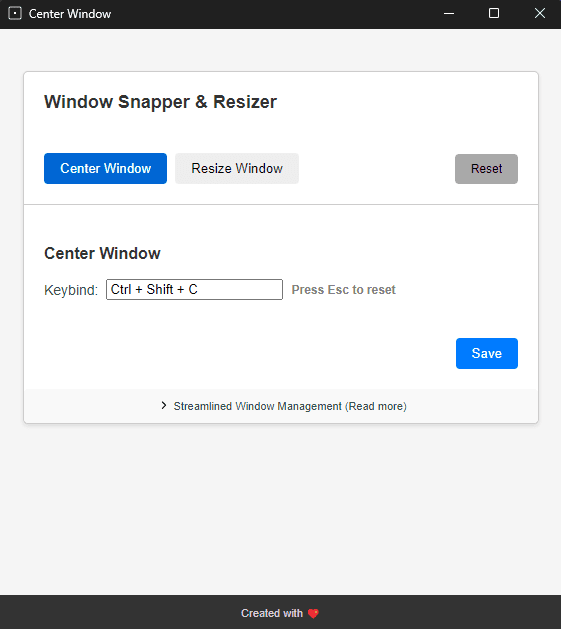
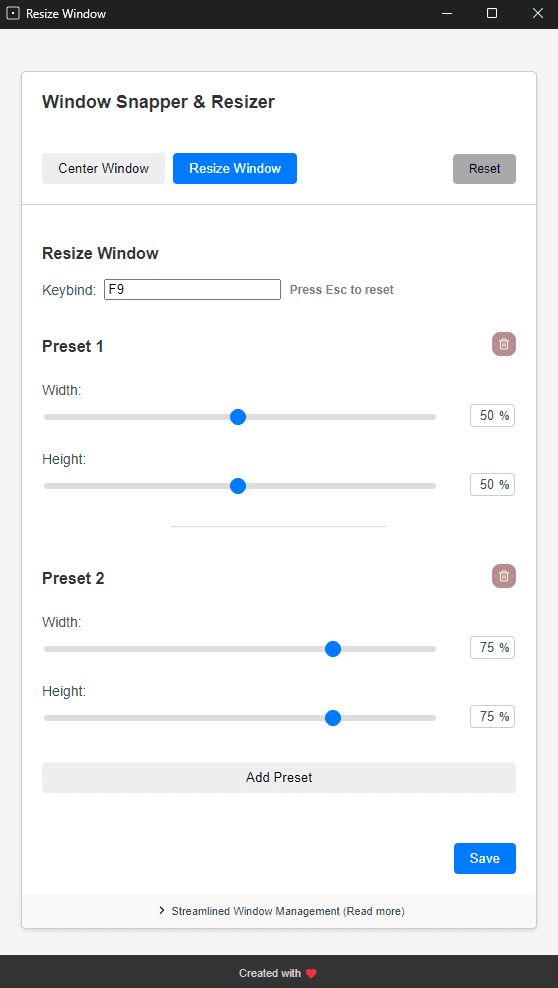
To give you a better idea of how the application works, here are some screenshots:
Conclusion
The "Window Center & Resizer" application exemplifies how traditional scripting languages like AutoHotkey can be seamlessly integrated with modern web technologies to create an intuitive and powerful user experience. By combining AHK with React and Electron, this application offers a robust solution for managing windows across multiple monitors, delivering the flexibility and precision that users need.
I encourage you to try out the application and share your feedback or even contribute to its development on GitHub. Your contributions and insights can help make this tool even better!
Additional Links to Full Files
- Full AHK Script:
center-window-resize.ahk - AutoHotkey Process Management:
autohotkey.ts - Settings Management:
settings.ts